 English
Any Manipulations Of Icons Made Easy
If your build process involves replacing icons in the release EXE files, Resource Tuner Console is the solution! From now on, you no longer have to worry about how your applications look on Vista.
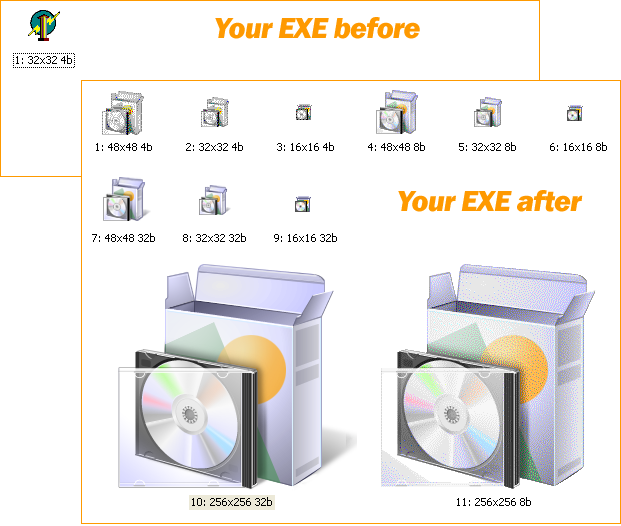
 No matter how slick the behind-the-scenes source code is, most users form their first impressions based on what they see — the icons. The large 256px icons contribute towards the elegant interface appearance. And this is probably the biggest pain point as not every IDE allows for embedding this resource type, and not every installation software creates installer EXE's with the right icons embedded.
This problem that may affect coders at all experience levels. If you don't use the most modern up-to-date IDE, then you likely have problems with adding large icons to your applications.
Resource Tuner Console addresses this issue by letting the developer embed these icons into the compiled EXE or DLL files from the command line. Not only does Resource Tuner Console handle the large Vista icons in .ico format, it supports for adding icons in .png compressed format. No matter what IDE or installer maker you use to produce an executable file, RTC can handle any 32-bit and 64-bit unmanaged PE files.
From now on, you don't have to change icons manually. Resource Tuner Console provides many ways of batch replacing Icon entries in the IconGroups. You can specify whether to add a new icon, or replace the existing icon, or replace the existing icon only if there is an icon in the Icon Group that has the same width, height, and color depth as the icon specified, or replace an icon with only the specified language.
For greater detail, see the Edit Icons sample script. It may be helpful to use this example as a template for your own scripts.
See also: RTC Usage
SAMPLE SCRIPTS LIBRARY
Resource Tuner Console comes with the examples that explain basic functionality and demonstrate many of the features available in Resource Tuner Console. Once installed Resorce Tuner Console, you will find the Demo folder nested within the directory where RTC has been installed. Within this Demo folder, there are 12 subdirectories containig sample scripts and sample executable files.
All sample scripts are ready to run. Select one of the .BAT files located within the Demo folders to execute the sample script. The script will make changes in the test EXE file. The resulting file will be created in the directory named "Release" under the directory containing the script.
 Check out the script examples to get an idea of what RTC can do for you.
The Complete Illustrated Step-by-Step Guide To Using Scripts
Get Started with a 60-Day Free Trial
Download ResTuner Console and learn how it can make you more productive.
 Resource Tuner Console runs on all versions of Windows in use today: from 11 to XP, either 32-bit or 64-bit.